 eKhajana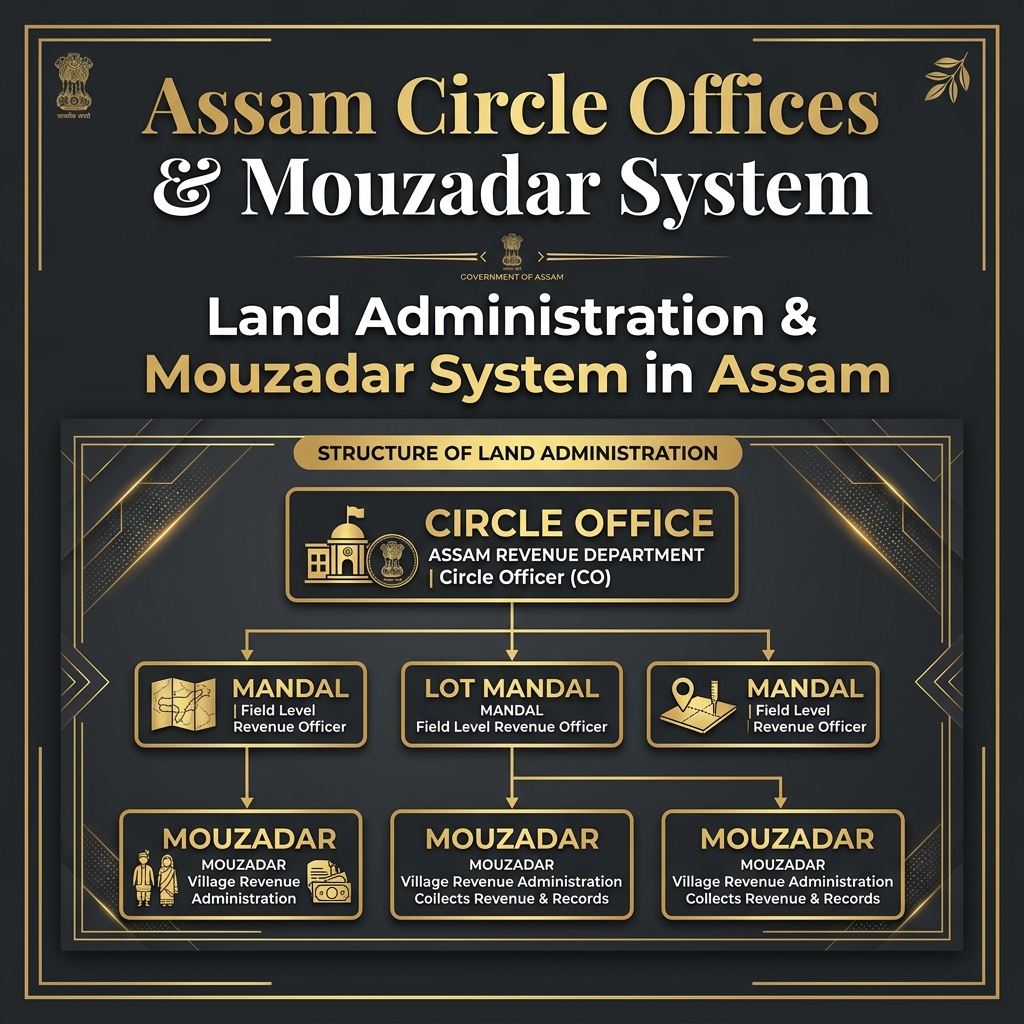
Have you applied for e-Khajana online on the Sewa Setu portal, only to see your application stuck on the status "Pending with LM/Mouzadar" for weeks? Many citizens in Assam face this issue. To solve it, you must first understand how land administration works in Assam and the specific roles of the Circle Office, the Lot Mandal (LM), and the Mouzadar.
Here, I will explain the role of these administrative officers in the e-Khajana payment system and what steps you must take to get your pending files approved. Let's get started.
The Land Revenue Hierarchy in Assam
To collect land revenue and maintain records, the Assam government uses a structured system from the state level down to the village level:
1. The Revenue Circle Office
The state of Assam is divided into multiple Revenue Circles (e.g., Dispur, Sonapur, Katigorah, Jorhat, etc.). Each Circle Office is headed by a Circle Officer (CO). The Circle Officer is the administrative head who oversees all land transactions, mutations, disputes, and tax collections in that circle block. The CO has the authority to approve or reject Namjari applications, land partition orders, and other land settlement requests. They are also responsible for ensuring that the Lot Mandals and Mouzadars under their circle work efficiently.
2. The Lot Mandal (LM)
A Revenue Circle is further divided into small administrative areas called "Lots". Each Lot is managed by a field officer known as the Lot Mandal (LM). The Mandal is the actual keeper of land records. They carry out physical land surveys, verify land boundaries, record plot measurements in the field book (Chitha), and maintain the village map.
Every time a citizen applies for mutation, partition, or e-Khajana registration online, the Lot Mandal is responsible for doing the first level of verification. They physically visit the plot if needed, cross-check the digital application with the paper Chitha, and send their recommendation to the Circle Officer.
3. The Mouzadar System
In Assam, villages are grouped into historic tax-collection zones called Mouzas. Each Mouza is overseen by a Mouzadar. The Mouzadar is a local agent appointed by the government (often a hereditary post) responsible for collecting land revenue (Khajana) from the landowners in their Mouza and depositing it into the government treasury.
The Mouzadar system is one of the oldest revenue collection systems in Assam, with roots going back to the British colonial era. Unlike the Lot Mandal who is a salaried government officer, the Mouzadar works on a commission basis, earning a percentage of the total Khajana they collect. This creates an incentive for Mouzadars to actively reach out to landowners and ensure timely tax payment.
Their Role in the e-Khajana Online System
When you submit a new registration application for e-Khajana on the Sewa Setu portal, the application does not calculate your tax automatically. It goes through a verification flow:
- Verification by Lot Mandal: The application first goes to the Lot Mandal of your area. The Mandal verifies your Dag and Patta numbers, checks the land area, and confirms if you are the actual owner.
- Tax Calculation by Mouzadar: Once the Lot Mandal verifies the land details, the application goes to the Mouzadar. The Mouzadar checks the previous tax history, calculates the pending land revenue (Khajana) dues, and enters the payable amount into the online portal.
- Approval: After the Mouzadar updates the tax amount, the status changes to "Disposed" or "Approved", and the payment button becomes active in your Sewa Setu dashboard.
This status means your application is waiting in the queue for the Lot Mandal or Mouzadar to manually review your records. Since thousands of citizens apply online daily, land officers often face a high backlog, causing applications to remain pending for more than 15 days.
How to Resolve "Pending with LM/Mouzadar" Status?
If your application has been pending for more than 15 to 20 days, waiting online will not help. You should take these active steps:
- Print out the RTPS Acknowledgement Receipt that you received after submitting your e-Khajana form online.
- Locate your local Circle Office or the office/residence of your Mouzadar. (You can ask local villagers or panchayat members for directions to the Mouzadar's house, as they often operate from home offices).
- Visit the Lot Mandal or Mouzadar directly. Show them your printed acknowledgment receipt and request them to verify your application online.
- Since they have access to the administrative login portal, they can search your reference number and approve it on the spot. Once they click approve, the payment option will show up in your mobile dashboard immediately.
By taking these simple steps, you can avoid delays and complete your online land tax payment easily.
How to Find Your Circle Office?
Finding your revenue circle office is easy:
- Ask your local Gram Panchayat: The GP secretary or president can give you the address of your circle office.
- Check the Assam Revenue Department website: Visit revenueassam.nic.in and look for the list of circles under your district.
- Google Maps: Search "Revenue Circle Office [your area name] Assam" on Google Maps for the exact location and phone number.
- District Collector's website: Each district in Assam has an official website listing all circle offices, Lot Mandals, and contact numbers.
Common Problems & Troubleshooting
- Application pending for over 30 days: Escalate to the Circle Officer by visiting the circle office and submitting a written complaint (Darkhast) requesting them to direct the Lot Mandal to act.
- Mouzadar entered wrong tax amount: If the amount shown on your dashboard seems too high, contact the Mouzadar and request a recalculation. Bring your land area details from the Jamabandi as reference.
- Application rejected by LM: The rejection reason will be noted in the portal. Common causes are incorrect Dag/Patta numbers, name mismatch, or land under dispute. Correct the issue and re-apply.
- Cannot find Mouzadar: Contact the Revenue Circle Office and request the Mouzadar's contact details for your Mouza area.
Pro Tips
- Keep a printed copy of your RTPS acknowledgment number at all times after applying online.
- If your Mouzadar is unresponsive, you can directly contact the Revenue Circle Officer via the official RTI portal or file a complaint on the CM helpline of Assam.
- The CM Helpline number in Assam is 15100. You can call and register a complaint if your land services are unreasonably delayed.
- Early mornings on working days (Monday to Friday) are the best times to visit the Circle Office as officers are generally available and queues are shorter.
Frequently Asked Questions
Q: How many revenue circles are there in Assam?
Assam has over 200 revenue circles spread across its 35 districts. Each circle is headed by a Circle Officer (CO). Major districts like Kamrup Metropolitan and Nagaon have multiple circles to handle the large population and land area.
Q: Is the Mouzadar a government employee?
No, the Mouzadar is not a regular salaried government employee. They are an appointed local revenue agent who works on commission. They earn a fixed percentage of the total Khajana they collect from landowners in their Mouza. However, they operate under the supervision of the Revenue Circle Office.
Q: How long should it take for the Lot Mandal to verify my e-Khajana application?
Under the RTPS Act, the Lot Mandal should verify and forward the application within 7 to 15 working days. If it takes longer, you can file a complaint at the circle office or on the CM Helpline (15100).
Q: Can I pay e-Khajana without Mouzadar approval?
No. The Mouzadar must first calculate and enter the tax amount in the online system before the payment button becomes available. This is a mandatory step in the current Sewa Setu system and cannot be bypassed.
Q: What is the difference between a Lot Mandal and a Patwari?
The Lot Mandal in Assam is equivalent to the Patwari in states like Punjab, Haryana, and Rajasthan. Both are field-level revenue officers responsible for maintaining land records, conducting surveys, and verifying land transactions. The name is different but the function is largely the same.
Conclusion
The Circle Office, Lot Mandal, and Mouzadar system forms the backbone of land administration in Assam. Understanding their roles is crucial for any landowner navigating the e-Khajana payment system. If your application is stuck in the "Pending" status, don't just wait — take proactive steps to personally visit the relevant officer and get it resolved. With a bit of follow-up, you can complete your land revenue payment smoothly and keep your land records up to date.
Detailed Verification Flow of e-Khajana
Understanding the exact path your application takes can help you identify where it is stuck:
| Stage | Officer Involved | Action Performed |
|---|---|---|
| 1. Submission | Citizen / CSC | Application submitted online with Dag/Patta details. |
| 2. Field Verification | Lot Mandal (LM) | Matches details with the physical Field Chitha book. |
| 3. Tax Calculation | Mouzadar | Calculates pending land revenue dues based on rates. |
| 4. Final Approval | Circle Officer (CO) | Approves the application, activating the online payment button. |
Frequently Asked Questions
Q: Why is my e-Khajana payment button not active?
A: The payment button only becomes active after your local Lot Mandal and Mouzadar verify your details and enter the calculated tax amount online. Until then, the status will show 'Pending'.
Q: What is a Mouza in Assam?
A: A Mouza is a historical land revenue unit consisting of a group of villages. Each Mouza has a designated Mouzadar who is responsible for collecting land tax.
Q: Can I pay my land revenue directly to the Circle Office?
A: Yes, you can visit the Circle Office, but for tax payments, they will usually direct you to the respective Mouzadar of your village or ask you to pay online.
Q: How can I find the contact details of my Lot Mandal?
A: You can visit the local Revenue Circle Office or check the Dharitree portal, which lists the mandal details for each village.
Q: How long does the online approval take?
A: It typically takes 10 to 15 days. If it exceeds 20 days, it is highly recommended to visit the Mouzadar or Lot Mandal physically.